True Shape Nesting for Acrylic Keychains — 95 Parts on a 600×400mm Sheet in 14 Seconds
Acrylic keychain production has a quiet bottleneck most shops ignore: imposition. Designers send in dozens of differently-shaped cut-lined PDFs, and someone — usually the most experienced operator — spends an hour rotating, dragging, and Tetris-ing them onto a print sheet.
It's not glamorous work. It's also not work humans should be doing in 2026.
This post walks through how Pressria Bridge (PB) handles acrylic keychain nesting end-to-end, and why True Shape Nesting matters specifically for this category.
The acrylic keychain problem
A typical order in a Korean print shop's daily queue looks like this:
- 95 different keychain designs from 30+ customers
- Every design has its own outline (cut line) — characters, mascots, lettering, photos
- Sheet size is fixed (commonly 600×400mm for UV-printed acrylic)
- Material waste = direct margin loss
Unlike rectangular sticker sheets, acrylic keychains are irregular shapes. You can't grid them. A 50mm-tall character standing next to a 30mm circular logo wastes the gap unless something packs them intelligently.
Manual imposition handles this with human pattern recognition and a lot of patience. Automated imposition handles it with a class of algorithms collectively called True Shape Nesting.
What "True Shape Nesting" actually means
Most nesting tools are rectangular. They draw a bounding box around each design and pack the boxes. That's fine for stickers on a sheet, terrible for keychains — the empty space inside each bounding box is unused material.
True Shape Nesting works on the actual contour of the cut line, not the bounding box. Two L-shaped pieces can interlock. A small circle can nest into the concave curve of a larger character. The result is dense packing that no rectangular algorithm can match.
The trade-off is computational cost. Bounding-box packing runs in milliseconds. True Shape Nesting on 95 mixed shapes can run for minutes — or seconds, depending on the implementation.
PB uses a custom Grid+NFP hybrid engine: identical or near-identical shapes get grid-packed (fast), while mixed shapes use No-Fit Polygon (NFP) calculation for true contour nesting. This is the same approach surveyed in nesting research, but tuned specifically for print imposition rather than sheet metal cutting.
The PB pipeline: PDF in, Illustrator out
Here's the actual workflow for a keychain job:
Step 1 — Drop the PDF
The designer's PDF already contains the cut line (typically as a CutContour spot color path on a separate layer). The operator drops it into PB's hotfolder. That's the only manual action.
Step 2 — Automatic nesting
PB watches the hotfolder, picks up the file, runs the Grid+NFP hybrid algorithm against the configured sheet size, and produces a nested PDF with all designs packed onto the sheet.
Step 3 — Auto-sync to Illustrator
The nested result opens automatically in Adobe Illustrator via a CEP plugin. The operator sees the final layout, can make any last adjustments, and sends to print. Layers, spot colors, and OCG structure from the original PDFs are preserved through the nesting step.
Zero clicks between the hotfolder drop and the Illustrator preview.
Real numbers from a real sheet
The screenshot below shows an actual PB nesting result:
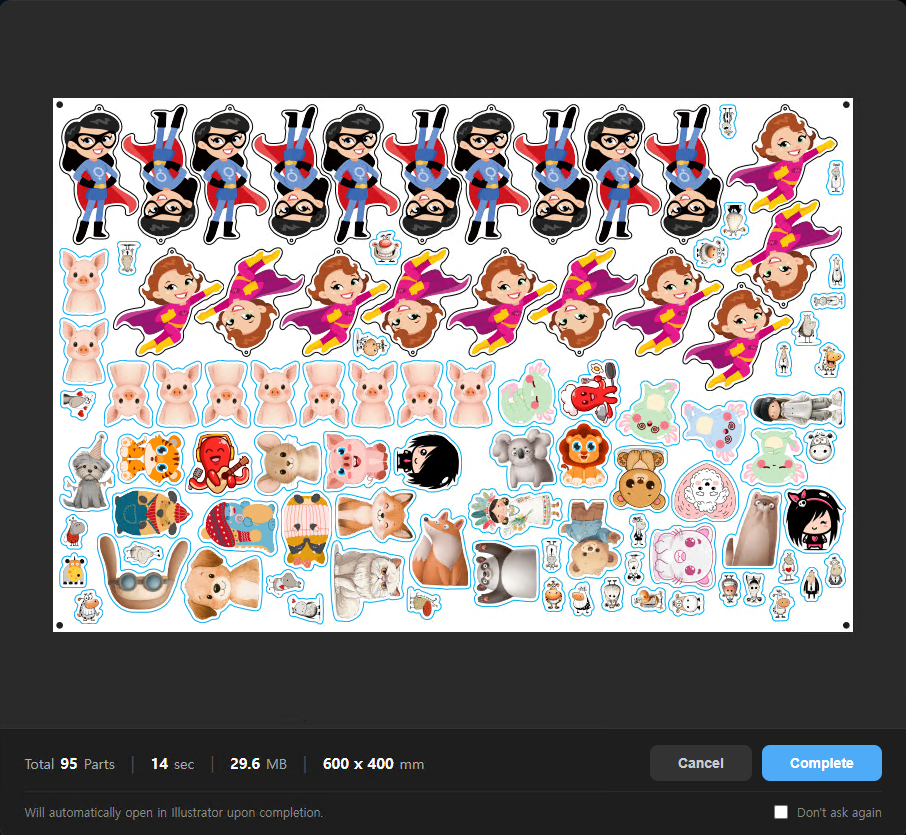
- 95 parts — mixed character keychains, photo-based designs, lettering, mascot shapes
- 14 seconds — total processing time on an i9-14900K
- 600×400mm — standard acrylic sheet size
- 29.6MB — output PDF with full vector cut lines and embedded images
For comparison, a skilled operator manually imposing the same 95 parts in Illustrator would typically take 30–60 minutes, and the resulting density is often lower because humans get tired and stop optimizing after the obvious placements.
Why PDF-input matters for keychains
This is where the keychain pipeline differs from the sticker pipeline. Stickers in PB go through background removal (rembg) and automatic cut line generation, because customers upload raw images. Keychains skip all of that — the cut line is already in the PDF, drawn by the designer in Illustrator.
That means:
- No image processing step (faster)
- Designer's exact intended outline is preserved (no algorithm guessing where the edge should be)
- Spot colors, layers, and any pre-applied effects pass through untouched
For acrylic, this is the right tradeoff. The cut line on a keychain has to be exactly what the designer drew — a 0.5mm difference between intended outline and printed outline is visible to the customer.
What this replaces
Before PB, the typical Korean acrylic keychain shop workflow was:
- Receive 30+ customer orders via the shop's storefront (in Korea, this is typically Naver Smart Store, the country's largest e-commerce platform)
- Download each PDF
- Open in Illustrator
- Manually rotate, scale-check, and place each design on a sheet
- Save sheet, send to RIP, print, cut
Steps 2–4 took roughly one hour per sheet. A shop running 5 sheets a day spent 5 hours on imposition alone.
With PB, steps 2–4 collapse into "drop file in folder, wait 14 seconds." One of the top-selling acrylic keychain shops on Naver Smart Store has processed 13,577 unique customer designs over 13+ months of PB usage, with peak days hitting 113 unique designs in a single day. Note that these are design counts, not unit counts — each design typically gets produced as multiple keychains per order, so the actual production volume is several times higher.
Caveats
Two things worth being honest about:
- First-time setup matters. Cut lines need to be on a recognizable layer or spot color (CutContour is standard). PDFs with cut lines embedded as filled shapes or buried in groups need preprocessing — PB has a separate preprocessing module for this, but it's an extra step.
- NFP is not magic. On highly irregular shapes with deep concavities, even good NFP implementations leave some unavoidable waste. The 20%+ material savings figure from earlier posts assumes a reasonable mix of shapes; pathological cases (e.g., 95 identical thin crescents) won't see the same gain.
The takeaway
True Shape Nesting for acrylic keychains is a solved problem — but only if the entire pipeline is automated. Manual imposition kills the throughput advantage. PDF-in/Illustrator-out with hotfolder triggering is the configuration that actually scales.
If you're running an acrylic keychain shop and still imposing by hand, the math is straightforward: every minute spent in Illustrator dragging shapes is a minute not spent on print runs, customer service, or sleep.
Pressria Bridge is a Windows desktop application that automates print production workflows including nesting, cut line generation, and Illustrator integration. Free trial available at pb.pressria.com.